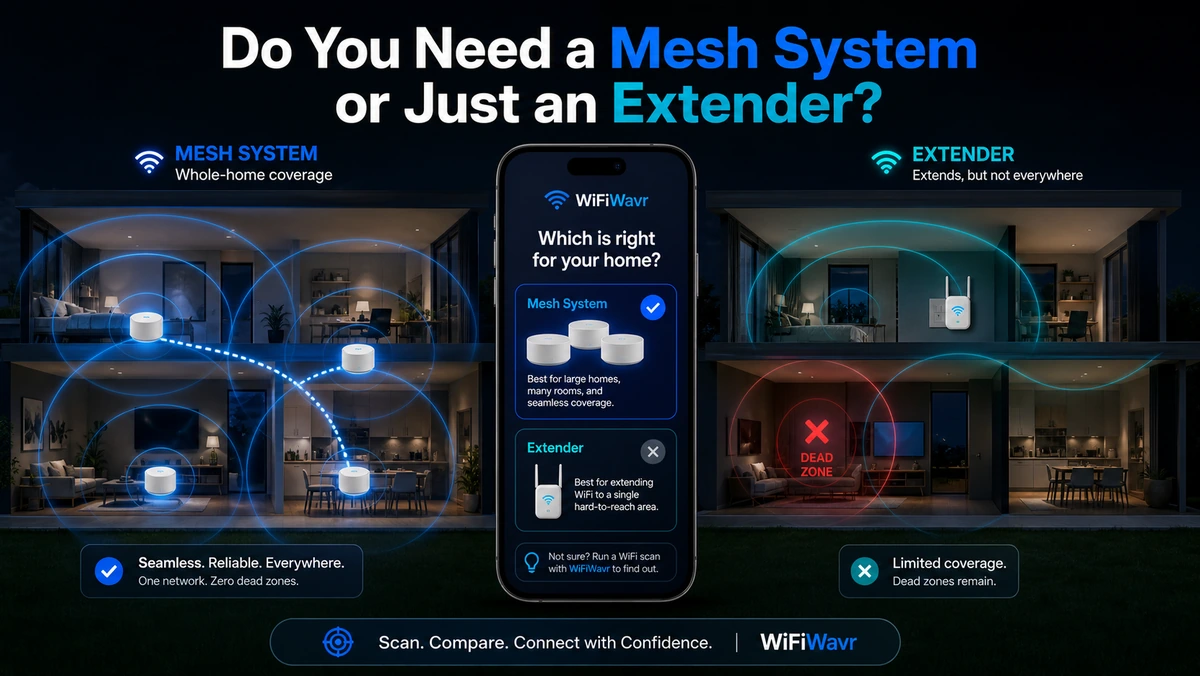
You've got a weak room, you've decided to throw hardware at it, and now the internet is yelling two answers at you: "just get a cheap extender" and "extenders are garbage, buy a mesh system." Both camps are right — for different houses. The trick is knowing which house you have before you spend $30 or $300.
What each one actually is
A WiFi extender (or repeater/booster) is one cheap device that grabs your router's existing signal and rebroadcasts it to stretch coverage into a weak spot. Simple, inexpensive, and aimed at a single problem area. The classic downside: it often creates a second network name, and because it's repeating a signal that's already weakened, the speed on the far side is usually a fraction of your main network.
A mesh system is a set of units (a main plus one or two satellites) that act as a single seamless network. Your phone hands off from one to the next as you walk the house, same name, no dropping. It's built for whole-home, multi-floor coverage — and it costs more.
Extender: one cheap fix for one stubborn dead zone. Mesh: seamless coverage for a whole big house. Match the tool to the problem, not the price tag.
The honest decision guide
- One weak room, tight budget, fine with a second network name? An extender will probably do it. Don't overspend.
- Large home, multiple floors, or weak spots all over? Mesh. Bolting three extenders onto a big house is a worse experience than one mesh set built to cooperate.
- You roam while on calls (house, yard, garage) and hate the drop when you switch? Mesh, for the seamless handoff.
- You haven't tried moving the router yet? Stop. Do that first — it's free.
Step zero: don't buy anything yet
Most "I need a mesh system" problems are actually "my router is in a terrible spot" problems. Before you buy, open WiFi Wavr and test a better router location. Move it central, high, and out in the open, then walk the weak rooms with the compass and watch the readings. Surprisingly often the dead zone just fills in and you've spent nothing.
Find the exact spot to place it
If you do need hardware, placement is everything — and it's where most people get it wrong. They plug the extender into the outlet inside the dead zone, where there's barely any signal to repeat, and wonder why it's still bad.
Do this instead: walk from your router toward the weak area with the signal compass on, and find the fade point — where the strength suddenly drops off a cliff. That's the edge of your good coverage, and it's exactly where the extender or mesh node belongs. It still has a strong signal to work with there, and it extends from that point onward.
Place it, then walk the dead zone again to confirm it filled in. Want specific hardware suggestions? See our gear picks. But measure first — the right device in the wrong spot is just an expensive night light.
FAQ
What's the difference between mesh and a WiFi extender?
An extender is a cheap single device that rebroadcasts your router's signal into one weak area, often on a separate network name. A mesh system uses several units as one seamless network that hands devices off as you move. Extenders suit one dead zone on a budget; mesh suits whole-home coverage in larger homes.
Do I really need mesh, or will moving my router fix it?
Try placement first — it's free and often enough. Move the router central, high, and open, then recheck coverage. Only if a room is truly too far for any router position do you need extra hardware. WiFi Wavr's compass lets you test placement before spending anything.
Where should I put an extender or mesh node?
At the fade point — where your router's signal starts dropping off a cliff, not inside the dead zone. A node placed deep in the dead zone has only a weak signal to rebroadcast. Walk from your router with WiFi Wavr's compass and place it where the strength begins to collapse.
Buy the right fix — and put it in the right spot.
WiFi Wavr tests router placement for free and finds the exact fade point where an extender or mesh node belongs, so you don't waste money guessing.
⬇ Download WiFi Wavr — Free