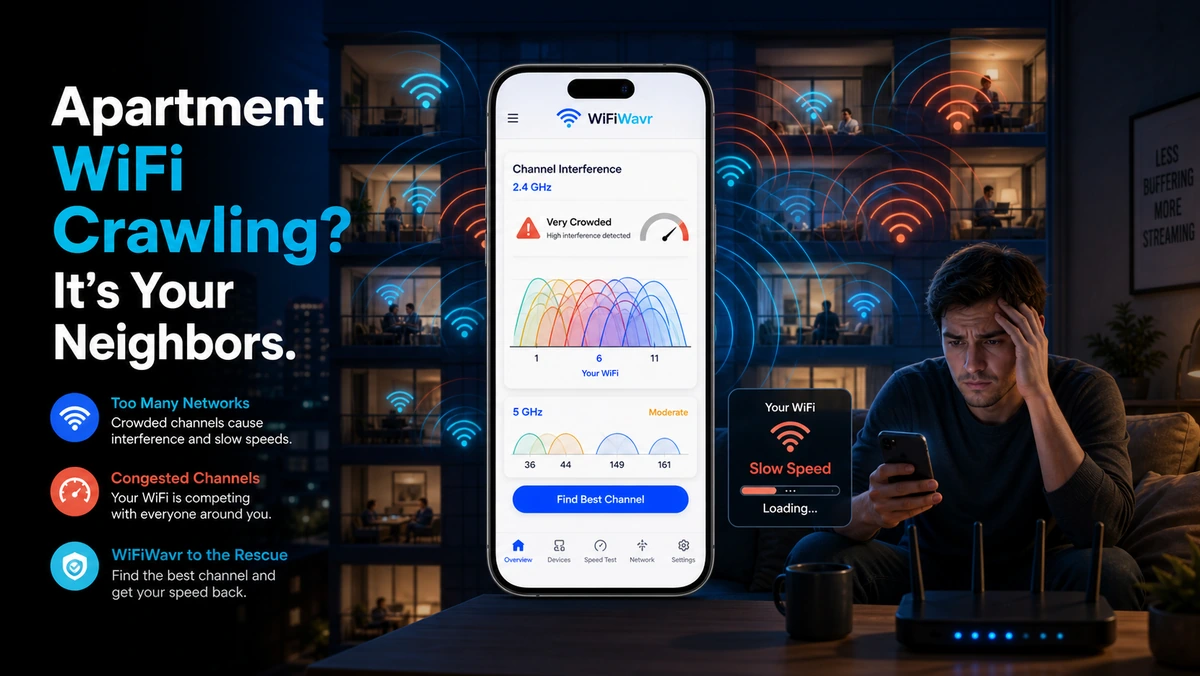
You live in a building. You open your phone's Wi-Fi list and there are twenty networks — "TELUS5934," "(hidden SSID)," "Cik_Mesh_1200," somebody's "Pretty Fly for a WiFi." Every one of those is a router, and a lot of them are shouting on the same few channels as yours. That's the whole reason your apartment Wi-Fi crawls at 8pm and your signal bars are lying about it being fine.
Strong signal, slow internet — how?
This trips people up. Your signal is strong, your plan is plenty, and it's still slow at night. That's because Wi-Fi channels are shared airspace, like lanes on a road. In a house in the suburbs, you've got the lanes mostly to yourself. In an apartment, twenty drivers are crammed into the same three lanes, all trying to merge at once during the evening rush. Nobody's signal is weak — the road is just jammed.
In an apartment, slow Wi-Fi usually isn't weak coverage. It's a traffic jam in the air, worst when the whole building is streaming at once.
See the congestion for yourself
Guessing won't help here, because you can't see radio. Wavr can. Open the channel check and it shows the busiest channels around you — laid out as bars so you can see, for instance, that 2.4 GHz channel 1 is packed with four networks while a 5 GHz channel sits nearly empty. It then names the clearest channel on each band and even tells you the steps to switch your router to it.
The free fix, in order
- Switch to a clearer channel. This is the big one. Log into your router and set the channel Wavr recommends. On 2.4 GHz, stick to the non-overlapping 1, 6, or 11 — whichever is least crowded. Two minutes, zero dollars, often a real speed jump.
- Favor 5 GHz. It has many more channels than 2.4 GHz, so it's far less of a dogfight in a dense building. Use it whenever you're close enough — here's the 2.4 vs 5 GHz rule.
- Move the router off the shared wall. If your router is pressed against the wall you share with a neighbor's router, you're sitting in each other's loudest spot. Shift it toward the interior — see placement.
What you can't fix — and what to do instead
You can't make your neighbors turn down their networks. But you don't need to. The goal is to get out of their lane, not clear the road. Pick the channel they're not on, ride 5 GHz where you can, and you're effectively driving on an emptier street while they fight over the busy one.
And if you make these changes and it's still slow with a strong signal and a clear channel? Then the congestion isn't the culprit, and it's time to check whether it's your router or your ISP. But in an apartment, nine times out of ten, the channel fix is the one that finally quiets the evening crawl.
FAQ
Why is my apartment WiFi so slow at night?
In a dense building, dozens of routers share the same few channels. In the evening everyone streams at once, so the airwaves jam and your speed drops even with strong signal and a fine plan. It's congestion, not coverage — crowded airspace, not weak signal.
How do I fix WiFi interference from neighbors?
Move your router to a less crowded channel and favor 5 GHz, which has far more channels than 2.4 GHz. WiFi Wavr scans nearby channels, shows the busiest, and recommends the clearest one to switch to — a free change that often restores speed.
Can I stop my neighbors' WiFi from interfering?
You can't quiet their networks, but you can get out of their way: pick a channel they're not crowding, use 5 GHz for its extra channels, and move your router off the shared wall. You're driving on an emptier lane instead of fighting for theirs.
See the traffic jam — then drive around it.
WiFi Wavr shows which channels your neighbors are crowding and names the clearest one to switch to, so your apartment Wi-Fi stops crawling at night.
⬇ Download WiFi Wavr — Free